|
Zeiss IOLMaster Customer Service: 1-877-486-7473 ext.
4030
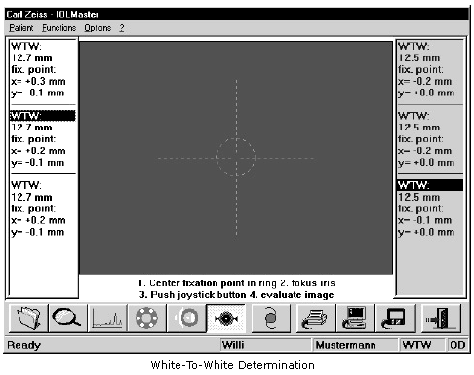
IOLMaster — White-to-White Measurement (WTW).
Determination of "White-to-White" (optional)
Activate the WTW mode by:
- clicking on the WTW icon
- pressing the <W> key
- pressing the <SPACE BAR> in ACD mode (ACD)
- The patient should look at the yellow fixation light
 in
the center. in
the center.
- Align the IOLMaster so that the six peripheral measuring points are
symmetrical to the cross-hair and the iris structures or the edge of the
pupil appears optimally focused.
The fixation point in the center of
the 6 light dots is usually not in the center of the pupil or iris,
because only in the rarest cases does the visual axis correspond to
the optical axis of the eye.
 |
WARNING:
Ask the patient if he or she sees the fixation point. If the patient fails
to fixate properly, the visual axis will not be correctly detected, which
may result in measuring errors. |
- Take the measurement by pressing the button on the joystick.
Each time the joystick button is pressed, an image of the eye is
displayed in which the detected iris edge is marked. After a check of
correct recognition of the iris and the fixed point has been performed,
confirm with OK. Only then is the data valid and available for further
processing.
|
WARNING:
The validity of the WTW determination depends on this check of
correct recognition of the iris edge. |
The WTW value is the horizontal diameter of the iris. In addition to the
WTW value, the distance of the visual axis from the center of the iris (x,
y) will also be displayed.
The values are stated in millimeters with reference to a Cartesian
coordinate system, the zero point of which is assumed to be in the
established center of the iris or pupil. If the visual axis is above the
iris or pupil center, the Y value will be positive; if it is below, the value
will be negative. X values to the left of the center are negative; those
to the right are positive.
 |
|
Note
If the software has difficulty detecting the iris or fixation point,
this may be due to inadequate room lighting. It is recommended
that the front panel and examined eye be shielded from direct or
lateral light. The best results will be obtained when the
examination room is slightly darkened. |
WTW measurement may be repeated as often as desired.
Measurement of Other Eye
The system automatically
registers which eye is being measured (OD or OS). All past readings of this
patient are still stored and may be retrieved as necessary. Measurements
of the other eye must be performed analogously to the previous eye.
|
|
Note
After each change of side, the overview mode is automatically
activated for coarse alignment. |
Proper Adjustment of IOLMaster
Ask the patient to relax and look at the yellow fixation light .
Focus on the iris, not on the illuminated dots. Adequate room lighting
will facilitate the detection of iris structures. Avoid direct exposure
of the eye and device front panel to extraneous light.
In particular, ensure that the visible right and left edge of the iris
is not disturbed by reflections from lamps and windows.
If the iris structure is not discernible, focus on the edge of either
iris or pupil.
Serious defocusing will result in incorrect data.
After the image has been taken, the operator should check if the
software has correctly detected the edge of the iris. If the circle
segments drawn in the image do not define the iris correctly, the result
must be discarded. Click on OK to confirm the results and save the data.
|




 IOLMaster Checklist (pdf)