|
Zeiss IOLMaster Customer Service: 1-877-486-7473 ext.
4030
IOLMaster — General Operation.
The IOLMaster may be operated by:
-
Icons (by cursor and/or touch-pad)
-
Keyboard or
-
Menus
IOLMaster Operating
System
For safety reasons, the IOLMaster operating system is not accessible
the user and works in the background.
 |
IMPORTANT:
Attempts to modify the IOLMaster operating system
are prohibited. In particular,
deactivation of the Windows firewall is not permitted. |
Windows operating conventions apply to the user interface
of the IOLMaster software. This relates to utilizing a
mouse/touch-pad, the use of icons, dialog boxes and
menus, confirmation by double-click, etc.
 |
Note:
The IOLMaster software does not support all Windows key shortcuts, e.g.
the special Windows keys existing on some keyboards are ineffective. |
The IOLMaster software uses only a few forced processes. The user may switch
freely between the individual modes. For a logical workflow, the user is
advised to observe the sequence of measurements described
in the IOL Master Instruction
Manual V.4.
In rare cases, a Windows error message may appear on the LC display.
This could happen, for instance, if the program flow is interrupted
(mostly by external interference, such as from mobile phones).
Risks to human beings are reliably precluded by multiple safety
mechanisms in the IOLMaster's hardware and software.
|
IMPORTANT: If warning messages appear frequently,
the IOLMaster should be taken out of service. For repair service, call:
Carl
Zeiss Meditec Service
877-486-7473.
The IOLMaster does not support the submission
of generated error reports sent to Microsoft.
|
Initiate Measurements
by Pressing Joystick Button
Touch-pad and
Keyboard
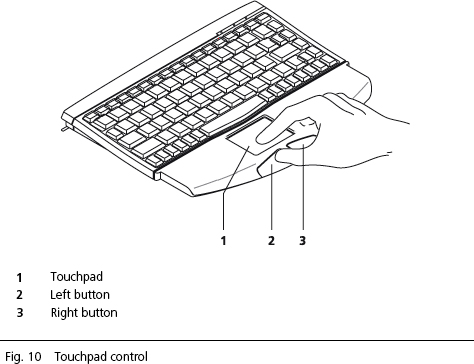

In addition to program control via touch-pad, you may activate
certain menus by pressing individual keys or key combinations. See:
Menu
Overview
Shortcut
Keys
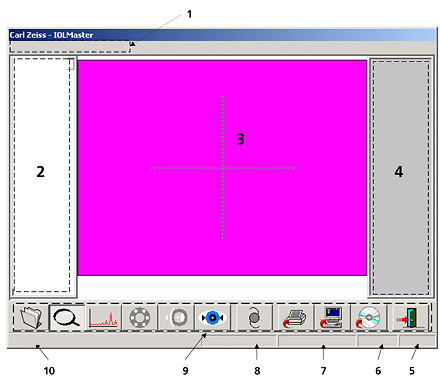
Screen Layout
-
Menu bar
-
Display field for measurements of right eye
-
Display field for video images
-
Display field for measurements of left eye
-
Eye
-
Mode (additionally in ALM mode: number of measurements)
-
Last name
-
First name
-
Icons
-
System messages/progress bar
 |
WARNING:
To avoid damaging the IOLMaster, when connecting external devices,
e.g. PC, monitor or an external
network, the operator must ensure
that the safety requirements of IEC
60601-1-1 (medical electrical
systems) are observed. |
|




 IOLMaster Checklist (pdf)