|
Zeiss IOLMaster Customer Service: 1-877-486-7473 ext.
4030
IOLMaster — Anterior Chamber Depth.
Measurement of Anterior Chamber Depth (ACD)
 |
WARNING: The anterior chamber depth may only be measured on phakic eyes!
ACD measurements of pseudophakic eyes result in measuring errors
and/or incorrect readings. The readings for pseudophakic eyes do not
reflect the anterior chamber depth. |
 |
|
Note
The keratometer measurement must be performed before anterior
chamber depth measurement!
|
Activate ACD Mode:
- Click on the ACD icon
- Press key <V>, or
- Press the <SPACE BAR> in KER mode (KER)
The lateral slit illumination will automatically be turned on. This
illumination subjectively appears to be very bright to patients.
Nevertheless, the patient should continue looking at the yellow fixation
light.
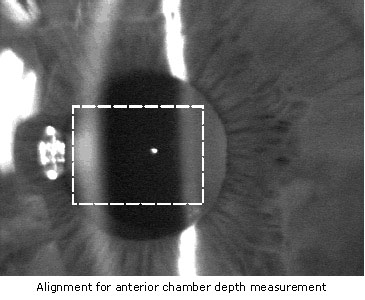
As a rule, the image of the fixation point will lie between the images of
the cornea and the crystalline lens. It should be close to (but not within)
the optical section of the crystalline lens! For system reasons, the
corneal image will be out of focus.
|
|
Note
The alignment of the IOLMaster, particularly in the case of small
pupils, requires a certain amount of practice on the part of the
operator and cooperativeness on the part of the patient. The
alignment procedure is easier on a dilated pupil (see also Tips for
keratometer measurement, page 82ff.). |
- Take the measurement by pressing the button on the joystick.
|
|
Note
Before starting, tell the patient to look steadily at the yellow fixation
light  - NOT into the slit projector, as the latter will flicker during the
measurement.
- NOT into the slit projector, as the latter will flicker during the
measurement.
When an acoustic signal is heard - the slit will
again illuminate steadily - the measurement has been completed
and the ACD values will be calculated.
|
|
|
Note
Anterior chamber depth on the IOLMaster is interpreted as the
distance between the anterior vertex of the cornea and the anterior
vertex of the eye lens. Hence, the displayed distance includes the
thickness of the cornea.
Calculation of the anterior chamber depth
requires the input of the corneal radius. If a valid keratometer
measurement was performed prior to ACD measurement, the system
will automatically use the measured radius for the calculation.
If for
any reason the IOLMaster was unable to measure the corneal curvature,
a window will appear requesting you to type in the radius (if the cornea
is astigmatic, the values of both principal meridians). |
Enter a value between 4.0 and 13.0 mm (use decimal point). Proceed
with OK or the <ENTER> key.
If you have selected the display Corneal K's, please enter a number
between 26 and 80 (D). When entering the corneal K's, make sure
that the same keratometer refractive index is set on the IOLMaster as
on the keratometer used for the measurement (see Setup).
A blue status bar will appear in the message bar. Five ACD readings will
be listed in the display field next to the video image, together with the
calculated mean value.
The anterior chamber depth measurement may be repeated as often as
desired.
If additional measurements are taken of anterior chamber depth, the
previous readings will be overwritten. To restore the last (just
overwritten) readings, press shortcut keys
<CTR> + <Z> ("UNDO"
function).
|
|
Note
The "UNDO" function itself cannot be undone.
|
|




 IOLMaster Checklist (pdf)