|
Activate Axial Length Measurement (ALM) Measurement
Mode:
- Click on the ALM icon, or
- Press key A, or
- Press the button on the joystick in Overview (OVW) mode.
 |
|
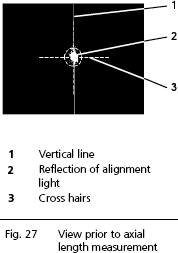
Switching to ALM mode will automatically change the magnification
ratio: a smaller section of the eye becomes visible with the reflection of
the alignment light and a vertical line (1, Fig. 27).
- The patient should look at the red fixation point in the
center. A cross-hair (3, Fig. 27) with a circle in the
middle will appear on the display.
- Fine-align the IOLMaster so that the reflection of the alignment light (2,
Fig. 27) appears within the circle.
|
 |
WARNING:
Ask the patient if he or she sees the fixation point. If the patient fails
to fixate properly, the visual axis will not be correctly detected,
which may result in measuring errors.
In the case of poor visual acuity/high ametropia ( + 6 D) it is advisable
to measure through the spectacles. If the procedure is followed correctly,
no measuring errors will be produced. Measurements should not be
taken while a patient is wearing contact lenses, as it will result in
measuring errors. |
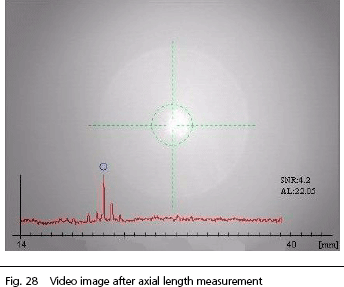
- Take the measurement by pressing the button on the joystick.
The corresponding display field next to the video image will
show the measured axial length. The video image will be overlaid
with a graph similar to those in ultrasonic measuring instruments.
Simultaneously, the axial length and signal-to-noise ratio (SNR)
of the measuring signal will be displayed. The SNR is a gauge
of the quality of measurement. Measurements with an SNR between
1.6 and 1.9 appear with an exclamation mark (!) after the measured
value and the message
"Borderline value!" will appear. For evaluation
of the SNR see Post-run editing of axial length measurements.
 |
|
Note
Borderline value! does not necessarily mean that the reading
is incorrect and must be rejected. It rather means that all axial
length measurements for the eye should be checked for
plausibility and consistency, e.g. according to the usual ultrasonic
biometry criteria. If the Uncertain values are
determined to concur with the other readings, the readings marked Borderline
value! should also be accepted as valid axial lengths. |
|
|
Note
The IOLMaster requires FIVE measurements to be taken. The
message Measure again will thus appear. Only then
will a mean value be passed on to the IOL calculation and an evaluation
enabled. Only the number of measurements is crucial here. To
obtain consistent results we recommend checking the individual
axial length measurements and carrying out further
measurements if necessary. |
With stronger lens opacities, it may be advisable to defocus
the IOLMaster. You may choose a reflection (2, Fig. 27)
as large as the circle on the display. If measurements are even
now impossible, the IOLMaster can be refocused and the reflection
shifted to the bottom and/or top margin of the circle on the
display by varying the vertical adjustment (turning joystick).
|
|
Note
Defocusing and shifting the reflection within the circle will have
no effect on the result, because interferometric axial length
measurement is completely independent of distance. |
- For the next measurement of this eye, press the button in the
joystick.
|
WARNING:
Up to 20 such measurements per eye may be taken on a single day.
Avoid measurements of eyes with retinal detachment. In such cases,
measuring errors cannot be precluded.
As a rule, the axial length should be viewed together with the values
for corneal refraction and overall refraction, and checked for plausibility.
It is likewise helpful to compare the right and left eyes. |
After the second measurement, the mean of the axial length
measurements will also appear. This value will be recalculated
and updated with each additional measurement. If the result of
one measurement differs by more than 0.1 mm from the other(s),
an Evaluation! message will be displayed. This indicates
that the measurement results must be edited later. See Post-run
editing of axial length measurements.
As long as Evaluation! is displayed in place of the mean
value, the potential measuring errors must be deleted or adjusted,
as the readings will otherwise not be adopted in the IOL calculation
and the database for optimization of the constants. The last
reading is always displayed with a blue background. The blue
marking can be moved through the table of readings with the help
of the cursor buttons ↑ ↓.
Error in the display field denotes readings with an SNR smaller
than 1.6. Such individual readings are excluded from the generation
of a mean value and do not need to be deleted.
The number of measurements of the respective eye taken on this
particular day is displayed in the Mode field of the status
bar next to ALM. If the count reaches 20,
no further measurements of this eye can be taken on this day.
The counter cannot be reset. Deleted readings (see above) do
not affect the measurement counter.
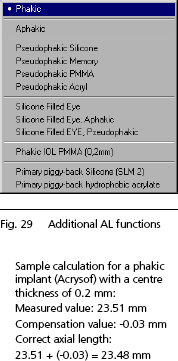
ALM Measurement of Non-Aphakic Eyes
To measure non-aphakic eyes, select the corresponding mode from
the AL Settings menu. This special AL mode is displayed
in the video image field and will be active until you reset it
via the menu. The IOL Master will also be reset to Phakic mode
if you change to the patient's other eye or a new patient.
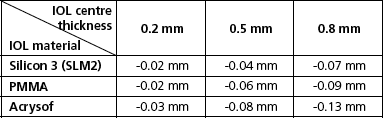
If the axis length of eyes with phakic implants not listed in
the additional AL functions is to be measured, the following
compensation values according to Dr
Wolfgang Haigis of Wurzburg University Clinic,
Germany, should be used.
 |
|
Every implant, e.g. a phakic IOL, influences the measurement
of axial length in PCI biometry.
If a phakic lens implant is measured
in a normal phakic mode, the result will be slightly elevated.
The reading must be corrected, depending on the material used
and the center. thickness. |
|
WARNING:
Two peaks may appear when measuring pseudophakic eyes
and with certain intraocular lenses. The first peak is a side maximum
of the IOL, while the second peak is produced by the retina.
In this case, manual correction is necessary (see Measuring
errors with pseudophakic eyes). It is expedient to measure
at a number of different points. |
Note:
Only in ALM mode is the fixation light RED  ;
otherwise it is always YELLOW ;
otherwise it is always YELLOW 
|




 IOLMaster Checklist (pdf)