|
Zeiss IOLMaster Customer Service: 1-877-486-7473 ext.
4030
IOLMaster — Overview Mode.
Overview Mode - Alignment Prior
to Measurements
 O
key, or the button with the magnifying glass icon, as pictured on the left. This is the Overview mode, which allows for coarse image
alignment prior to taking measurements. In this mode, the patient is
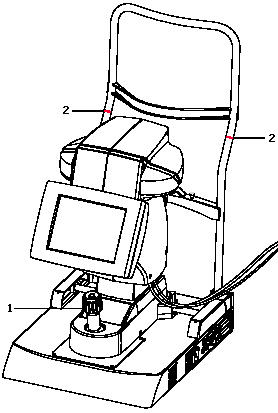
aligned with the IOLMaster by using the joystick (see 1 below). Vertical adjustment is made by turning the control knob. The patient's eyes should be level with the two
red
ring marks on the side rails of the headrest (see 2 below). O
key, or the button with the magnifying glass icon, as pictured on the left. This is the Overview mode, which allows for coarse image
alignment prior to taking measurements. In this mode, the patient is
aligned with the IOLMaster by using the joystick (see 1 below). Vertical adjustment is made by turning the control knob. The patient's eyes should be level with the two
red
ring marks on the side rails of the headrest (see 2 below).
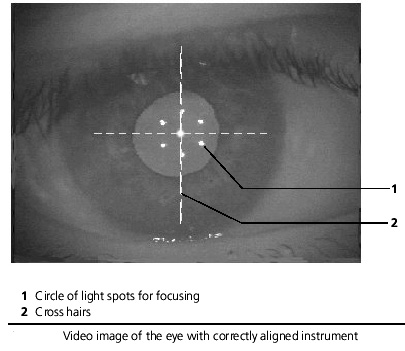
Tell the patient to look straight at the small yellow  fixation light and then adjust the
instrument-to-patient distance until the six light reflections on the
cornea (see 1 below) appear to be in focus. The small circle of lights
and the cross hairs (2) should be approximately centered in the patient's
pupil. This should be done prior to taking Axial Length Measurements. fixation light and then adjust the
instrument-to-patient distance until the six light reflections on the
cornea (see 1 below) appear to be in focus. The small circle of lights
and the cross hairs (2) should be approximately centered in the patient's
pupil. This should be done prior to taking Axial Length Measurements.
 Note:
Only in ALM mode is the fixation light RED Note:
Only in ALM mode is the fixation light RED  ;
otherwise it is always YELLOW. ;
otherwise it is always YELLOW.
|




 IOLMaster Checklist (pdf)