|
Zeiss IOLMaster Customer Service: 1-877-486-7473 ext.
4030
IOLMaster — Printout of Results.
Once the measurements have been completed, you may print out
the readings, composite signal, and a diagram of iris, pupil
and WTW.
Press the PRINT icon or <P> key to start the printing
process.
The
printout of the measured values may be started from ANY measurement
mode: [ALM], [KET], [ACD], [WTW].
The printout will include all results obtained so far (including
those of the other eye, if already available). It is advisable
to start the printout only if all measured values of both eyes
are available.
 |
IMPORTANT:
Consult the user manual supplied with the printer. Connect the printer
as described in Setting up the IOLMaster.
|
 |
The following print formats are supported
(upright format only): A4 (210 x 297 mm), Letter (8.5” x 11.0”),
B5 (182 x 257 mm).
While printing, do not take further measurements.
|
|
In ALM mode the printout of the graph with the blue highlighted
reading can be enlarged by pressing <CTR> + <P>.
For enlarging the display of the graph see: Zooming.
In WTW mode the current reading can be printed out using
<CTR> + <P>.
|
Printer Setup
Click on the Options menu > Setup > Add Printer.
This will bring up a dialog box for selecting and configuring the printer.
The options available will depend on the individual printer hardware and software.

Printer Troubleshooting
|
IMPORTANT: Only use printers recommended
by Zeiss. A list of the currently
recommended printers is available on the Zeiss web site: |
Carl Zeiss Meditec
If you encounter any problems during printing, first remove all printer drivers
you do not use:
-
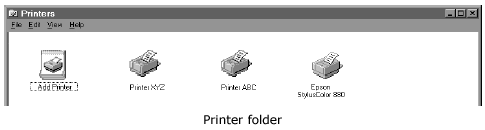
On the Options menu, select Setup > Add Printer.
-
From the printers window select the icon for the connected printer (e.g., Epson Stylus Color 880). Right click to view the drop down menu. Select Set as default.
-
Select the printers not connected (except for the "Add Printer" icon) and press the DEL key. Follow the instructions displayed on the screen.
-
Close the Printer folder again, when the un-install routine is finished.
If the printer troubles should persist, please call your service representative.
In the United States call Carl Zeiss Meditec Customer
Service, Ophthalmic Division at:
877-486-7473.
|




 IOLMaster Checklist (pdf)