|
Zeiss IOLMaster Customer Service: 1-877-486-7473 ext.
4030
IOLMaster — IOL Database
Establishing the Intraocular
Lens Database
Once all measurements have been taken (depending on the chosen IOL
power calculation formula), options may be generated for a particular intraocular
lens to be implanted. Before the system can calculate IOL power calculation
options, the available lens types must be entered into the database.
-
In Options - User Database, open the Please enter password dialog
box, as show below:
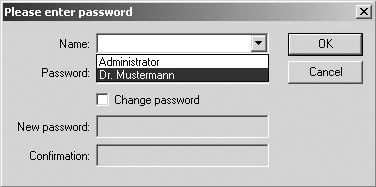
- Select the appropriate name and enter password as necessary. The
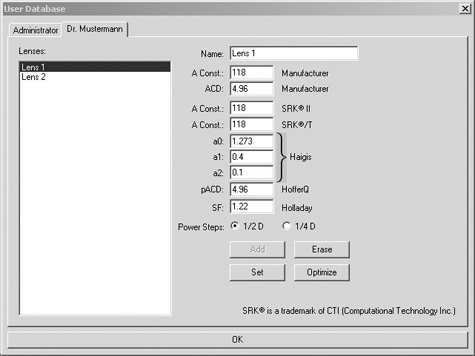
database window for entering specific lens data will open (for
registering a new user see User Database).
-
In the lines Name, A Const. Manufacturer and ACD
Manufacturer,
enter the respective data of the IOL manufacturer (from catalog or package
inserts).
 |
WARNING: If the ACD constant is not available, you may click
the Add button
after entering the A-constant.
All parameters will automatically be calculated
from the A-constant according to standard formulas.
However, the
manufacturer's A-constants are not optimal for optic biormetry and may
result in refractive errors. |
- Your IOL constants or personally calculated constants for various
IOL power calculation formulas, optimized for optical biometry, must be
entered/changed in the "A Const. SRKII, A Const. SRK/T, a0, a1, a2. pACD,
and SF boxes.
 |
Only lens constants optimized specifically for
optical biometry will produce accurate results. Calculating the
suggested strength of the intraocular lens to be implanted with the IOL
Master does NOT work using the manufacturer's IOL constants, only with
those specifically optimized for optical biometry.
(See: Optimization
of IOL Constants). |
- If you use lenses graded in 0.25 D intervals (in future), activate the
Power Steps 0.25 D radio button.
- To add data to the database, click the Add button
- To delete the data of the lens type selected in the Lenses field, click
the Erase button.
- By clicking the Set button, existing lens data will be overwritten by
edited data.
- To enter the data of the next lens, overwrite the name of the lens.
Exit the User Database by clicking on OK.
Next:
|




 IOLMaster Checklist (pdf)