|
IOLMaster — IOL Calculations.
Once all measurements have been taken
(depending on the IOL calculation formula), you may use the IOL
Master to generate IOL options to match the surgeon's surgical
and postoperative requirements. Before the system can calculate
IOL options, you must have entered the desired lens types into
the database. See: IOL
Database.
Start the calculation by clicking on the <I> key
or the IOL icon (shown above).
The IOL Calculation window will appear, in which the measured
values of both eyes are automatically entered. Depending on the
choice of refractive power/radii in the Program Settings submenu,
the keratometer readings are displayed in either Corneal K values (D) or
Radii (mm).
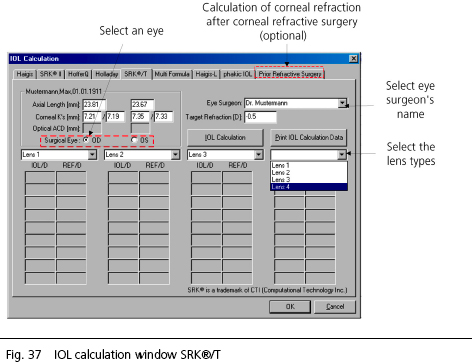
- Click on the appropriate tab to select the desired formula. The
Haigis, SRK®II, HofferQ, Holladay, and SRK®/T formulas
are implemented as standards.
- After refractive corneal surgery, the Haigis-L or Prior Refractive
Surgery tabs may be selected.
- Selected phakic lens implants may be calculated with the phakic IOL tab.
- Select the eye surgeon's name. This gives the surgeon access to lens
types saved to his or her database.
- The measured values may be edited if desired.
 |
WARNING: Readings appearing with an asterisk
(*) in the printout of the lens calculation have been edited and are
no longer based on the IOLMaster readings. Using these numbers
may result in refractive errors. |
- Select an eye for which the IOL is to be calculated on the screen.
- Enter the desired target refraction. No entry means 0 D (plano).
- Select suitable lenses from the lens types shown.
- After you have entered the necessary data, click on the IOL Calculation button
(shown below). This will start IOL calculation of each lens type selected.
The calculation will be performed for every measured eye. However, only the
data of the selected eye is displayed on the screen.

- To select the other eye, click on the Surgical Eye radio
button OD or OS. The lenses calculated for the other eye will
now be displayed.
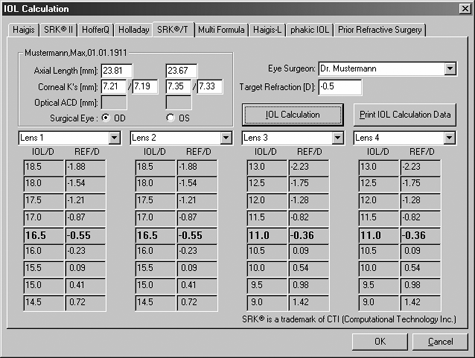
Calculated IOL data in IOL calculation window "SRK®/T"
In the columns below each specified lens you will find the calculated
refractive powers and target refractions for those lenses. The middle line
appearing in bold type indicates which refraction of the corresponding
IOL comes closest to the desired target refraction.
|
WARNING:
The IOL calculation is valid ONLY if the biometric
measurement was correct, an appropriate IOL calculation formula was selected,
and the IOL constants were optimized for this specific application. |
Printing:
The data calculated for the IOL to be implanted can be printed
out:
- Click on the Print IOL Calculation Data button.
The IOL data of both eyes or of one eye and emmetropic IOL will be
printed out either on a single page or on separate pages, depending
on the option selected in the Program Settings menu.
- Click on OK to finish IOL calculation.
|
