doctor-hill.com Carl Zeiss Meditec IOL Master  |
IOLMaster — Axial Length Measurement |

  |
GREEN SNR display --> reading is valid
YELLOW SNR display --> reading is uncertain ("Borderline SNR") |
Reasons for Low Signal-to-Noise Ratio:
- Dense medial opacity along the visual axis
- Restless patient
- Alignment of device to patient eye is not optimal
- Very high ametropia (> 6 D)
- Corneal scars
- Pathological changes in the retina.
 |
Note In this case, "Borderline SNR" or "uncertain" does not mean an incorrect result, it is only to remind you to verify this measurement! |
Should multiple peaks occur in the composite signal, it may be possible to identify the "correct" signal peak by comparison with the individual readings for this (and the other) eye and the anamnesis. See: Signal curves of axial length measurements, and Shifting the Measuring Cursor (below).
 |
RED SNR display --> reading should not be used |
It is marked on the display as an erroneous result.
This means that the true measuring signal does not stand out sufficiently from the noise. As a rule, the results of such readings are not usable and should be rejected. They can be deleted from the list by highlighting them and pressing the <DEL> key.
The reading may be transferred to the list of measured values by clicking on the measuring cursor (white dot). Before doing so, ensure that the readings are consistent.
Shifting the Measuring Cursor
The measuring cursor (white dot) is automatically placed on the center of the signal peak with the highest absolute amplitude. The corresponding axial length value is displayed beside the graph and in the display field. The SNR is calculated and displayed for this signal peak. The measuring cursor is placed in the center between the regions corresponding to half the maximal amplitude. If the signal curve is symmetrical (Gaussian curve), the cursor is positioned exactly above the maximum of the signal.
There are TWO ways to shift the measuring cursor to another peak; it is recommended that these manipulations be carried out in a zoom view of the measurement curve.
1. Automatic positioning over a "distant" peak
- Place the arrow cursor on the white dot, hold the left button depressed and move the measuring cursor over the other peak. For easier orientation, a vertical blue line will appear below the white dot. This line can be dragged with the cursor.
- When the button is released, the measuring cursor automatically snaps in over the desired peak.
 |
The display will show the corresponding axial length value and SNR (always smaller than the maximal SNR found automatically) and the recalculated measured value will appear in the display field denoted by an asterisk (*). |
Example:
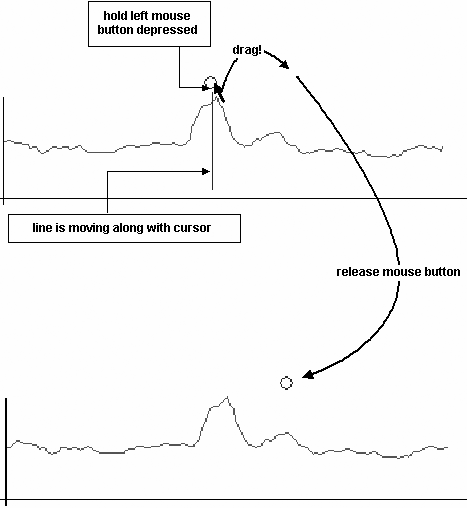
Moving the measuring cursor to a different peak (signal curve zoomed in 3
times)
| Note: This manipulation will work only if the measuring cursor is moved across the (local) maximum of the desired target peak. This procedure is necessary for the search algorithm to reliably find the desired peak without returning and snapping in to the original (higher) peak. Closely adjacent peaks (double peaks) cannot be separated by this automatic method unless the curve adjoining them drops down below a value that is less than half the amplitude of their maxima. |
|
While the measuring cursor is being dragged, the original reading and SNR are always displayed alongside the composite signal. The new axial length value and corresponding SNR will be calculated and displayed only when the button is released. |

2. Fine-shifting the measuring cursor
|
This kind of manipulation is advisable with closely adjacent double or triple peaks, and should always be done in a zoomed view! See: Zooming Display. |
- Proceed as described above under Item 1, but use the right button to drag the measuring cursor. This way the automatic peak detection is deactivated and the white dot can be positioned at any point over the measuring curve.
- When the button is released, the current axial length and the new SNR will be calculated and displayed.
Here again, the recalculated axial length measurement is shown in the display field with an asterisk (*).
|
Note Even if the manipulations are undone with the measuring cursor (by moving it back to the automatically found maximal peak) and the measured value agrees with the original one, the asterisk after the measured value will remain, indicating that the curve has been deliberately manipulated. |
The described manipulations of the measuring cursor may be performed both in axial length measurement mode (after the current individual measurement) and in post-run editing mode.