|
IOLMaster — White-to-White Measurement (WTW).
Determination of "White-to-White" (optional)
 |
WARNING:
Ask the patient if he or she sees the fixation point. If
the patient fails to fixate properly, the visual axis will not be correctly
recognized, which may result in measuring errors. |
- Take the measurement by pressing the button on the joystick.
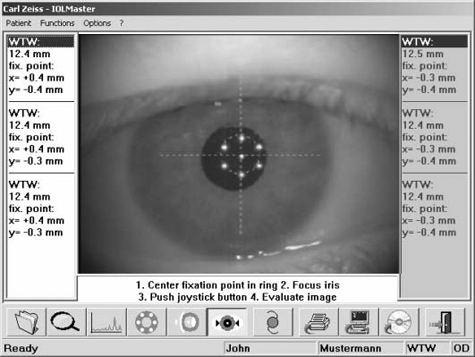
Fig. 34, White to White determination Each time the joystick knob is pressed, an image of the eye is displayed,
in which the detected iris edge is marked. After checking that the iris
and fixation point have been correctly recognized, confirm with OK.
Only then will the data be valid and available for further processing.
- After the image has been taken, the operator should check if the
software has correctly detected the edge of the iris. If the circle
segments drawn in the image do not define the iris correctly, the result
must be discarded.
|
WARNING:
The validity of the WTW determination depends on
this check of correct recognition of the iris edge. |
The WTW value is the horizontal diameter of the iris. In addition to
the WTW value, the deviation of the visual axis from the center of the iris
(x, y) will also be displayed (as seen above).
The values are stated in millimeters with reference to a Cartesian
coordinate system, the zero point of which is assumed to be in the
established center of the iris or pupil. If the visual axis is above the
iris or pupil center, the Y value will be positive; if it is below, the value
will be negative. X values to the left of the center are negative; those
to the right are positive.
 |
|
Note
If the software has difficulty detecting the iris or fixation point,
this may be due to inadequate room lighting. It is recommended
that the front panel and examined eye be shielded from direct or
lateral light. The best results will be obtained when the
examination room is slightly darkened. |
 WTW measurement may be repeated as often as desired. WTW measurement may be repeated as often as desired.
|

 .
.