|
IOLMaster — Safety Instructions.
Proper operation of the IOLMaster is imperative for its safe functioning.
Before using the IOLMaster, read the entire IOLMaster Instruction Manual,
which may be downloaded by following this link: IOL Master Instruction
Manual V.5.
Any actions contrary to this manual will
render all warranty claims invalid.
 Safety
Inspection: To ensure perfect and reliable operation, the IOLMaster
must undergo a safety inspection once a year by a Carl
Zeiss Meditec certified
service representative. Safety
Inspection: To ensure perfect and reliable operation, the IOLMaster
must undergo a safety inspection once a year by a Carl
Zeiss Meditec certified
service representative.
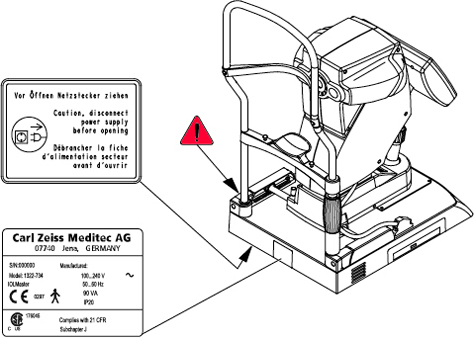
Identify and Read Safety Labels
LOCATE and READ the IOLMaster warning and information
labels indicated below:
Instructions for Installation and Use
This device is a high-quality technical product. To ensure perfect and
reliable operation, it must undergo a safety inspection once a year.
- The IOLMaster must ONLY be stored or operated in environmental
conditions as prescribed in the IOLMaster Technical
Specifications.
-
Do not operate the IOLMaster:
- in areas subject to hazards, concussion or explosion
- in the presence of inflammable anesthetics or volatile solvents,
such as alcohol, benzene or similar.
-
Do not store or use the IOLMaster in damp rooms. Do not expose the
IOLMaster to moisture of any kind, including water splashes, dripping water or
sprayed water.
-
Modifications and repairs, in particular those requiring the case of the IOLMaster
to be opened, may only be performed by service technicians employed
or authorized by Carl Zeiss Meditec.
- Carl Zeiss Meditec accepts no liability for damage caused by
unauthorized access to the interior of the IOLMaster. Such actions
will render any warranty claims invalid.
- The IOL Master may only be used with accessories and software supplied
by Carl Zeiss Meditec. Mains-operated accessories
must conform to IEC 60950-1 or 60601-1.
- The IOL Master may only be operated by trained
personnel.
-
In USA, the IOLMaster may only be purchased or ordered by physicians
and ophthalmologists.
-
The IOL Master Instruction
Manual V.5 should always be kept at hand for easy reference.
-
It is vital to comply with the instructions supplied with
IOLMaster accessories.
Printer Selection
Use only printers approved by Carl Zeiss Meditec.
- Use only the CD supplied by the printer manufacturer to install
the printer software.
- Consult Support.Microsoft.com before using older printers to determine whether printer drivers compatible with the
Windows®XP operating system are available and use these.
- Position the printer must always be positioned
outside the range of the patient (1.5 m from the patient’s seat at the
device).
- The operator should not simultaneously touch the patient and metal
parts of the printer.
- If a Protection Class II printer (without protective ground terminal) is
used, make sure that a power isolation transformer (see page 17 of the IOL Master Instruction
Manual V.5)
is connected to the printer power supply cable.
- Protection Class II printers (without protective ground terminal) whose wattage
(power consumption) exceeds the permissible connected load of the power isolation
transformer may not be used.
- If a Protection Class I printer (with protective ground terminal) is
used, make sure that it is connected to its own stationary wall
socket of the room's electrical installation or that a power
isolation transformer (see page 17 of the IOL Master Instruction
Manual V.5) is connected into the printer
power line. The required isolation transformer can be obtained
from Carl Zeiss Meditec.
- The power isolation transformer may not be used for printers whose wattage
(power consumption) exceeds the permissible connected load of the power isolation
transformer (e.g. laser printers).
 Electrical
Safety Electrical
Safety
- Additional portable multiple sockets or extension cords
may not to be used.
-
The electrical supply used with the IOLMaster must conform to IEC 60364-7-710
guidelines. USA and Canada only: single-phase 120 V AC connections with plug
type NEMA 5-15P.
-
During use of the IOLMaster, do not use a cellular telephone and other devices
not complying with EMC Class B requirements, as its signals may cause the IOLMaster
to malfunction. The effect of radio signals on the IOLMaster is
dependent on various factors and is therefore not predictable. To
avoid electromagnetic interference, the IOLMaster must be installed
and operated as described in the IOL Master Instruction
Manual V.5 and using
only those components supplied by Carl Zeiss Meditec.
-
With the exception of compatible printer drivers, the installation of
other software onto the IOLMaster is not permitted. The IOLMaster software is
programmed to prevent external (third party) software from being installed
on the system.
- The IOL Master may only be connected to private networks that are
protected from public networks (Internet) by firewalls conforming to
the latest technical standards. Such actions will render any warranty claims
invalid.
-
The built-in power supply unit of the IOLMaster is short-circuit-proof, and does
not contain any fuses accessible from the outside.
-
Provided the IOLMaster is properly used, no electrical hazards exist to
either patients or operators.
-
Only service technicians authorized by Carl Zeiss
Meditec may open or setup the IOLMaster.
Requirements for operation
Please take care that the following operational requirements are met
when using the IOLMaster:
Light emission from the IOLMaster
-
The limit values as specified for Class 1 laser devices to EN 60825-1 will
be observed if the IOLMaster is operated as intended.
|
|
Proper Shut Down Procedure
- Always enter the patient data (last and first name, date of birth) or ID
No. (depending on setting in Setup menu).
- Pull the power supply cable immediately
if damage or unspecified problems occur!
- Switch off the device as follows:
- Click on the EXIT icon on the toolbar (shown above) or <E> key..
- Confirm with OK or <ENTER>.
- When the "It's now safe to turn off" message appears, turn the
IOLMaster off by the main power switch.
The program will automatically close; the readings for the last
patient will be saved and the IOLMaster will shut down automatically
(lamp in the switch goes off).
 |
IMPORTANT:
For as long as the switch lamp is lit, internal
components are still under voltage, even after the device has been switched
off at the power switch!
All-pole disconnection of the device has not been achieved until the
switch lamp goes off. The lamp must be off before the power supply is
unplugged or the device switched off at the main room switch. Failure
to observe these instructions may result in loss of data.
To completely disconnect from the
power supply the IOLMaster must be unplugged. The power cable
should not be pulled or the main switch of the room installation
activated until the screen is blank.
The device may not be switched on again until the switch lamp goes off!
The procedure described
above does not apply in the case of breakdowns or if the
device does not respond to your input. If this occurs, switch off the
device immediately and pull the power supply plug. Label the device as
being defective and call Carl Zeiss Service.
|
Disposal Requirements
The IOLMaster's internal control computer contains electronic components
and a lithium battery (type CR 2032). At the end of its useful life it must
be properly disposed of in compliance with local regulations.
 Disposal of the product within the EU Disposal of the product within the EU
In accordance with applicable EU guidelines at the time at which the IOLMaster
was brought onto the market, the product specified on the consignment note
is not to be disposed of via the domestic waste disposal system or communal
waste disposal facilities.
For more information on disposal of the IOLMaster, please contact Carl
Zeiss Meditec or
its legal successor company. Please also take note of the latest online
information at Carl Zeiss Meditec.
If the IOLMaster or its components are resold, the seller must inform the
buyer that the product must be disposed of in accordance with the currently
applicable national regulations.
User Safety Obligations
The user of the IOLMaster is responsible for ensuring that:
- The IOLMaster is used in accordance with the instructions provided in this
manual.
- Deviations from the target refraction are precluded by proper
handling of the device:
- Patient must fixate correctly
- The IOLMaster must be precisely focused for keratometry or anterior
chamber depth measurements.
- Biometry formula must be properly used
- Only adjusted IOLMaster constants may be used
- The IOLMaster is only used in a perfect operating condition without
functional impairment.
- The IOL Master Instruction
Manual V.5 and all accompanying documents are maintained in
good condition and kept on or in the immediate vicinity of the
device.
- Only sufficiently trained and authorized personnel is permitted to
operate, maintain and repair the IOLMaster.
- All operating personnel receives regular instruction on all issues
concerning the IOLMaster and its components, that such persons are
familiar with the IOL Master Instruction
Manual V.5 and, in particular, the safety
precautions.
- None of the IOLMaster warning signs on the system are removed or rendered
illegible.
- Before any patient measurements are taken, the IOLMaster is inspected
according to Checking the Measurement Functions, as are contained within the IOL Master Instruction
Manual V.5.
- Each day no more than 20 axial length measurements are taken on
each patient's eye.
- An IOLMaster safety inspection is performed on the device each year, as are
contained within the IOL Master Instruction
Manual V.5,
in order to guarantee its perfect operating condition.
Compliance with Standards
and Regulations
- The IOLMaster is a Class Ila medical instrument as defined by the
European Medical Device Directive (MDD).
- The IOL Master complies with the EC Medical Device Directive 93/42/EEC
and its national equivalent in the form of the German Medical
Products Act (MPG), as specified in section: Manufacturer's
Declaration.
|