doctor-hill.com Carl Zeiss Meditec IOL Master  |
IOLMaster — Axial Length Measurement.
| |||||||||||||||||||||
|
Activate Axial Length Measurement (ALM) Measurement Mode:
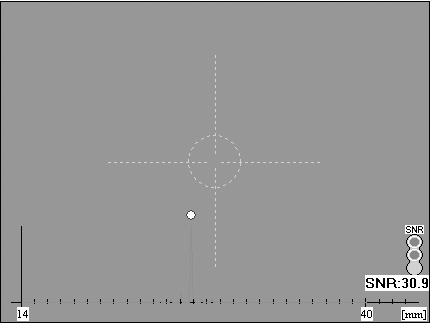
The corresponding display field next to the video image will show the measured axial length. The video image will be overlaid with a red graph similar to those in ultrasonic measuring instruments. Simultaneously, the axial length and signal-to-noise ratio (SNR) of the measuring signal will be displayed. This value is a gauge of the quality of measurement. Measurements with an SNR between 1.6 and 1.9 appear with an exclamation mark (!) after the measured value and the message "Borderline value!" will appear. For evaluation of the SNR see Post-run editing of axial length measurements. Readings that deviate from the internally calculated mean value by more than 50 μm are shown in red and marked "multiple peaks".
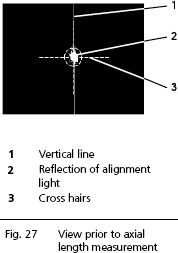
With stronger lens opacities, it may be advisable to defocus the IOLMaster. You may choose a reflection (2, Fig. 27 above) as large as the circle on the display. If measurements are even now impossible, the IOLMaster can be refocused and the reflection shifted to the bottom and/or top margin of the circle on the display by varying the vertical adjustment (turning joystick).
The composite signal is calculated after the fifth measurement. Initially, the individual signals are displayed in red. After a delay of about 1 second the composite signal is then displayed in blue. In addition, the axial length reading determined from this composite signal will appear. The composite signal will be re-calculated after each further individual measurement, and an axial length calculated therefrom. Should a reading deviate from another by more than 0.05 mm, it will be displayed in red and the message Multiple peaks will appear. This indicates that the individual measurements should be scrutinized and the composite signal may need to be post-run edited, as explained in: Post-run Editing of Axial Length Measurements. Until an axial length can be determined from the composite signal, the word Evaluation! will be displayed below the horizontal line in the list of measurements. If necessary, the potential individual measurement errors must be deleted or the composite signal post-run edited, as the readings obtained will not otherwise be accepted for the IOL calculation and database for optimisation of the lens constants. Until the fourth individual measurement has been taken, the last reading will be highlighted in blue. From the fifth individual measurement onwards, the composite signal is highlighted in blue. The blue highlighting can be moved through the table of individual readings with the aid of the cursor buttons ↑ ↓. In this way the signal curves of the individual measurements can be displayed. Deleted individual measurements can be restored with the shortcut <CTRL> + <Z>. The composite signal can be displayed by clicking on the composite reading. Error in the display field denotes readings with an SNR smaller than 1.6. The following plausibility tests are performed with the axial length measurement (AL) from the composite signal:
If this warning appears, be sure to verify that no pathological changes have occurred in the eye. If necessary, the measurements must be repeated (provided the maximum of 20 measurements per eye and day has not already been reached). Only confirm the warning with OK if you are certain that the readings are plausible. Otherwise, try to determine what has caused the implausible readings. A reference to the displayed plausibility test message will be transferred to the comments box. The number of measurements of the respective eye taken on this particular day is displayed in the Mode field of the status bar next to "ALM". If the count reaches 20 no further measurements of this eye can be taken on this day. The counter cannot be reset. Deleted readings (see above) do not affect the measurement counter!
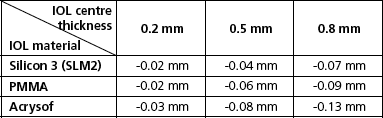
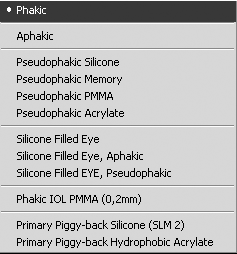
ALM Measurement of Non-Aphakic Eyes To measure non-aphakic eyes, select the corresponding mode from the AL Settings menu. This special AL mode is displayed in the video image field and will be active until you reset it via the menu. The IOL Master will also be reset to Phakic mode if you change to the patient's other eye or a new patient. If the axis length of eyes with phakic implants is to be measured, and are not listed in the additional AL functions, the following compensation values according to Dr Wolfgang Haigis of Wurzburg University Clinic, Germany, should be used.
|


 Important: