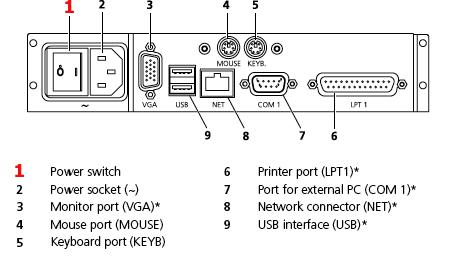
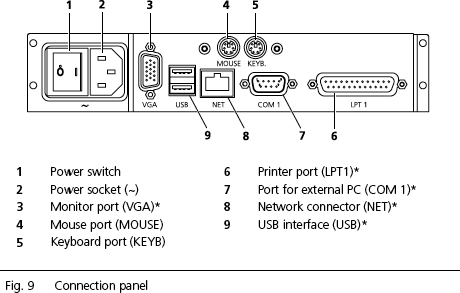
- Connect mouse and keyboard
- Optional: Plug in and secure monitor (VGA) and interconnecting
cable (NET/COM 1)!
- Connect power cable.
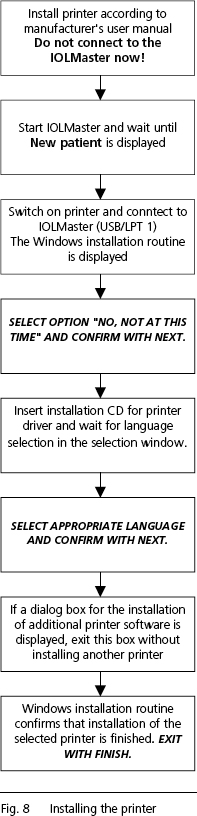
- Install printer as shown in Fig. 8 (to the right).
 IMPORTANT: Use
only printers recommended by Carl Zeiss Service. IMPORTANT: Use
only printers recommended by Carl Zeiss Service.
Only one printer
may be installed. De-install all surplus printer drivers using the menu
Setup - Printers.
Before using an older printer, enquire at Microsoft™ or the
manufacturer whether it is compatible.
 WARNING: WARNING:
* When connecting an external device, e.g. PC, to a port or an external
monitor to the VGA port, the operator must ensure that the safety
requirements of IEC 60601-1-1 are observed (medical electrical
systems).
A network isolator can be ordered from Carl Zeiss Service for connection to an
external network (NET).
The IOLMaster may only be connected to private networks which are
protected from public networks (Internet) by firewalls conforming to
the latest technical standards.
When the IOLMaster is turned on at the power switch, it will run through
an internal test. The IOL Master can be operated after this has
completed successful.
Certain operating parameters are factory set and
may be changed in the Setup Menu (see
page 33 of the IOL Master Instruction
Manual V.4).
|